AI Cartoon Explainer Video Generator
Turn a money or business question into a narrated cartoon explainer, with bold, expressive characters and a new illustrated scene for every point.


AI images · Natural pace · No music · Hard cuts · Can be animated
Opens ShortFast with the Cartoon Explainer style selected. Create an account to generate.
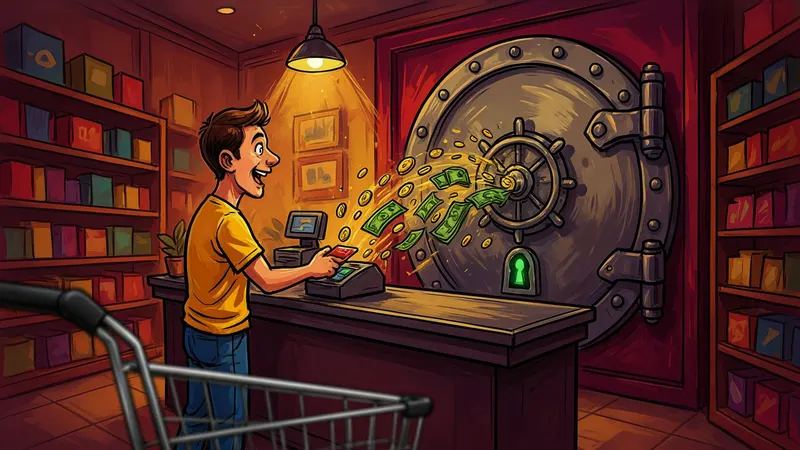
Create a cartoon explainer videoThe cartoon explainer look is bold digital illustration: thick black outlines, caricature characters with oversized heads, saturated color and richly painted backgrounds under dramatic lighting. Many finance and business channels use it to make dry subjects play out like a story, with a worried homeowner, a smug lender or a founder staring over a cliff edge standing in for the numbers.
ShortFast makes these videos from a topic or a pasted script. It writes the narration or keeps yours word for word, picks one of 21 voices, splits the script into scenes and draws each one in the cartoon style with a shared cast and palette. Captions are burned in, and the result downloads in 9:16, 16:9, 4:5 or 1:1, or posts itself to TikTok, YouTube Shorts and Instagram Reels.
Making a cartoon explainer video
- 01
Describe the topic or paste a script
Start from an idea such as "Renting vs buying a home: the real math", or paste a script you already wrote and ShortFast keeps your words.
- 02
The AI splits it into scenes
Every scene gets its own picture, and a shared palette, setting and recurring characters keep each image in the Cartoon Explainer look from the first scene to the last.
- 03
Voice, captions and pacing
Pick one of 21 narration voices. Captions are burned in, and the Cartoon Explainer defaults (natural pace, no music, hard cuts) are already set. You can change any of them.
- 04
Download, post or run a series
Download the video, auto-post it to TikTok, YouTube Shorts and Instagram Reels, or turn the theme into an automated series that makes a new episode on a schedule.
Caricature turns abstract money into characters
Finance and business topics are made of abstractions: interest, margins, debt, market share. A cartoon explainer gives each one a face. The credit card company becomes a grinning figure holding a fishing rod, and the renter and the buyer become two neighbors comparing receipts over a fence. Exaggerated heads and expressions make the stakes readable at a glance, which is what a scrolling viewer needs in order to stay.
The saturated color and dramatic lighting do a second job. They give a video about mortgage math a sense of production value, which matters on a feed where the next video might be a big-budget ad. The thick outlines keep every character legible at phone size, even with a caption sitting over the lower part of the frame.
The tone the style sets is knowing and slightly comic. It suits scripts that explain how something works to someone who has been on the wrong end of it: hidden fees, subscription traps, the fine print on a loan, or why prices at the store keep creeping up.
Where cartoon explainers fit, and where they feel wrong
The natural home is personal finance, business breakdowns and economics: renting versus buying, how credit card companies make money, why a company is valued the way it is, how a pricing trick works. Crypto and tech explainers fit too, as long as the script explains rather than hypes. Anything with a protagonist, a problem and a number at the end works.
It also handles commentary on current events, because caricature can show a situation without needing footage of the people involved. Keep the characters generic rather than drawing recognizable public figures, both for fairness and because generic characters age better in a back catalog that people keep finding months later.
It is a poor match for calm or somber subjects. A bold cartoon about grief, a serious diagnosis or a tragedy reads as flippant. It also adds little to topics where the real image is the point, like travel destinations or product reviews, where the viewer wants to see the actual place or thing rather than a drawing of it.
Pacing a cartoon explainer so the numbers land
This style defaults to normal pace, no background music and no transitions. Normal pace changes the image when the idea moves on, around every five seconds, which gives a viewer time to take in a detailed scene and hear the number that goes with it. Leaving out music keeps the narration clear during the math, and hard cuts keep the video brisk without a wipe between every point.
Structure the script as a question with a surprising answer. Open with the claim, walk through the steps with one scene per step, then come back to the number. "Renting can leave you richer than buying, and here is the math" earns the next ten seconds; a definition of home equity does not. A 60-second version holds about 150 words, which is one comparison done properly.
Give the video recurring characters, such as a narrator figure or a young couple, and ShortFast keeps them. The AI that splits the script writes a shared cast, setting and palette inside the cartoon style, so the same couple appears from the first scene to the verdict. For longer breakdowns, choose 1 to 2 or 2 to 3 minutes, and the Advanced plan goes to 8 to 15 minutes.
Run it as an automated series
Give ShortFast one theme and it makes a new cartoon explainer video on a schedule, every day, twice a day or a few times a week. Each episode covers a new topic on the theme, and the video is emailed to you or posted to your accounts. Themes that work well in this style:
- One personal finance question answered per video
- How a famous company makes money, a new one each time
Niches that suit this style
Crypto
A playbook for a faceless crypto channel built on news and explainers rather than price predictions. Formats, hooks, a sample script, RPM ranges and how to stay on the right side of platform and advertiser rules.
Open NicheFinance
A playbook for running a faceless finance channel: personal finance, investing and money explainers built from stock footage and narration. Formats, hooks, a sample script, RPM ranges and the monetization path.
OpenCommon questions
- How should a cartoon explainer show numbers and charts?
- Through characters and objects rather than charts. AI images are unreliable at drawing exact figures and text, so let the narration and burned-in captions carry the numbers while the scene shows what they mean: a stack of coins shrinking, a character buried in bills, a renter and a buyer walking two very different roads. The caption puts the exact figure on screen.
- Do the same characters appear in every scene?
- Yes, that is how the scenes are written. The cartoon art direction leads every image prompt, and when ShortFast splits your script it defines recurring characters, a setting and a palette inside the style. A couple comparing rent and a mortgage stays the same couple, drawn the same way, from the hook to the conclusion.
- Can I monetize cartoon explainer videos made with AI?
- There is no guarantee, and platforms judge the content rather than the tool. They reward original, non-repetitive videos that give viewers real value. For a finance channel that means a script written for each question, numbers you have checked, and topics that do not repeat. Mass-produced, near-identical uploads are what monetization policies are designed to exclude.
- Can I turn a finance question into a daily series?
- Yes. Set a series theme like one personal finance question answered per video, or how a famous company makes money with a new one each time, and choose a schedule from weekly up to twice a day. Every episode takes a new topic on that theme. Each video can reach you by email with a download link or be posted automatically.
Other illustrated styles

Stick Figures
Hand-drawn doodle characters
Great for History · Psychology · Explainers
AI images · Fast cuts · No music

Anime
Cel-shaded, painted skies
Great for Stories · Life lessons
AI images · Natural pace · Music

Flat Vector
Clean shapes, science-explainer look
Great for Science · Space · How it works
AI images · Natural pace · Music

Whiteboard
Marker doodles on white
Great for Education · Finance · Self-help
AI images · Fast cuts · No music
Make your first cartoon explainer video
ShortFast writes the script, draws every scene in this style, adds the voice and captions, and can post it for you every day.